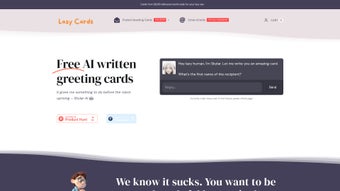

Download Lazy Cards – AI‑Powered Personalized Greeting Card Maker
Overview
Lazy Cards is a cloud‑based greeting‑card platform that blends cutting‑edge artificial intelligence with a sleek, user‑friendly interface to make the creation and delivery of personalized cards virtually effortless. Powered by an AI assistant named Skylar, the service guides you through crafting heartfelt messages for any occasion—birthdays, weddings, anniversaries, graduations, holidays, and even corporate thank‑you notes—while also handling the visual design of the card. Whether you prefer a quick eCard that lands instantly in an inbox or a physical postcard that arrives at a loved one’s doorstep, Lazy Cards covers both needs.
Free eCards are available for unlimited sending, and printed cards start at just $2.99, with transparent international shipping options that keep the cost reasonable for users worldwide. The platform eliminates the typical bottlenecks of greeting‑card creation: you no longer need to browse endless templates, struggle with wording, or worry about branding that detracts from your personal touch. Every printed card arrives brand‑free, and every eCard bears the sender’s name, ensuring a genuine connection.
While the service requires an internet connection and offers limited customization for printed cards, its speed, AI‑driven assistance, and transparent pricing make it a compelling tool for anyone who wants to send meaningful greetings without the usual hassle. Lazy Cards also complies with GDPR and CCPA regulations, guaranteeing that personal data is stored only as long as necessary for order fulfillment, and all transactions are secured with TLS 1.3 encryption. This combination of privacy, affordability, and AI‑enhanced creativity positions Lazy Cards as a modern alternative to traditional stationery stores and generic e‑card services.
Key Features & Benefits
- AI Message Generator (Skylar) – Skylar suggests thoughtful, occasion‑specific messages, adapting tone and length to match the recipient. The AI is trained on millions of greeting‑card phrases, allowing it to produce warm, natural‑sounding text in seconds.
- Free eCard Library – Hundreds of ready‑to‑send eCards are available at no cost, with instant delivery via email or social link. The library is refreshed monthly, ensuring fresh designs for trending holidays and cultural events.
- Print‑On‑Demand Physical Cards – High‑quality printed cards start at $2.99, shipped worldwide with competitive rates. Cards are printed on premium cardstock with matte or glossy finishes, and the service offers optional gift‑wrap for an extra personal touch.
- Quick‑View Browsing – A “quick view” feature lets you preview card designs without leaving the main gallery, speeding up the selection process for users on tight deadlines.
- Personalized Sender Name – Every eCard includes the sender’s name, while printed cards arrive brand‑free for a truly personal feel. You can also add a short signature line or custom closing phrase.
- Secure Payment & Data Handling – Payments are processed through encrypted channels; no personal data is stored beyond what is necessary for shipping. PCI‑DSS compliance protects credit‑card information.
- Multi‑Device Accessibility – The web app works seamlessly on desktop browsers, tablets, and smartphones (Windows, macOS, Android, iOS). Responsive design ensures the UI adapts to any screen size.
- Automatic Updates – New templates and AI improvements are rolled out automatically, keeping the experience fresh without manual downloads or installations.
The integration of AI not only speeds up the creation process but also improves the emotional relevance of each message. Users report that Skylar’s suggestions feel “human‑like,” reducing the anxiety that often accompanies writing greeting notes. Moreover, Lazy Cards’ pricing model encourages frequent use: free eCards can be sent without any hidden fees, while the low cost of printed cards makes occasional physical mail affordable.
International shipping, although dependent on local postal services, is priced transparently at checkout, avoiding surprise surcharges. The platform’s design prioritizes speed—cards load within seconds, and the checkout flow is streamlined to a few clicks, which is particularly valuable for last‑minute occasions. In addition, Lazy Cards offers a “favorites” feature that lets you bookmark preferred designs, and a “history” tab that records previously sent cards for easy re‑use.
Overall, Lazy Cards presents a balanced mix of convenience, affordability, and personalization that addresses the core pain points of traditional greeting‑card services.
Installation, Usage & Compatibility
How to Get Started
Lazy Cards is a web‑based application, so there is no traditional “installation” required. To begin, visit the official site (www.lazycards.com) and create a free account using an email address or a Google/Facebook login. After confirming your email, you are taken directly to the card gallery.
From here, you can either select a free eCard or opt for a printed version. Choosing a printed card triggers a simple checkout process where you enter the recipient’s mailing address, select shipping speed, and complete payment through a secure SSL‑encrypted portal. For eCards, you simply input the recipient’s email address, add a personal note (or let Skylar generate one), and hit “Send.” All actions are performed within the browser, making the tool instantly accessible on any device that supports modern web standards.
Step‑by‑Step Usage
- Sign Up / Log In – Register with email or social login; no software download required.
- Select a Card – Use the quick‑view feature to browse designs; filter by occasion, style, or color.
- Generate a Message – Click the “Ask Skylar” button; type a brief prompt (e.g., “Birthday for a 30‑year‑old friend”) and let the AI propose a message.
- Customize (Optional) – For eCards, you may edit Skylar’s text, add a photo, or change fonts; printed cards have limited customization (only message editing).
- Choose Delivery – Select “eCard” for instant email delivery or “Print & Ship” for a physical card.
- Enter Recipient Details – Provide email address for eCards or full mailing address for printed cards.
- Checkout – Review price (free for eCards, $2.99+ for prints), apply any promo codes, and complete payment.
- Confirmation – Receive an email receipt; eCards are delivered immediately, printed cards are processed within 24 hours and shipped according to selected speed.
- Track & Manage – Use the “Orders” dashboard to track shipment status, re‑send a card, or download a PDF copy of an eCard for archiving.
- Support & Feedback – Access a live‑chat help widget for troubleshooting, or submit feedback that directly influences future AI updates.
Compatibility (itemprop="operatingSystem")
Because Lazy Cards runs entirely in the browser, it is compatible with all major operating systems and devices that support HTML5, CSS3, and JavaScript. Tested browsers include:
- Google Chrome (latest version) – Windows 10/11, macOS, Android, iOS
- Mozilla Firefox – Windows, macOS, Linux, Android
- Microsoft Edge – Windows, macOS, iOS, Android
- Safari – macOS and iOS (iPadOS included)
The responsive design automatically adapts to different screen sizes, ensuring a smooth experience on desktops, laptops, tablets, and smartphones. No additional plugins or extensions are required, and the service works over both Wi‑Fi and mobile data connections. Users on older operating systems (e.g., Windows 7 or iOS 10) may experience slower load times but can still access core functionality. For organizations that enforce strict firewall policies, Lazy Cards can be whitelisted by allowing traffic to www.lazycards.com and its CDN endpoints.
Pros, Cons & Frequently Asked Questions
Before deciding whether Lazy Cards fits your workflow, it helps to weigh its strengths against its limitations. Below you’ll find concise bullet points that summarize the most frequently mentioned advantages and drawbacks by real users, followed by a curated FAQ that addresses common concerns about security, customization, and delivery.
Pros
- AI‑generated messages save time and reduce writer’s block.
- Free eCards with unlimited sending keep costs low.
- Low‑price printed cards start at $2.99, with transparent international shipping.
- Brand‑free physical cards maintain a personal feel.
- Responsive web app works on Windows, macOS, Android, and iOS.
- Secure payment processing and data encryption meet industry standards.
- Automatic updates add new templates and improve AI without user effort.
- Favorites and order‑history features streamline repeat use.
Cons
- Limited customization options for printed cards (no custom images or fonts).
- Dependence on internet connectivity; offline use is not possible.
- Physical card delivery times vary by region and postal service.
- No native desktop or mobile app—everything runs in a browser.
- AI suggestions may occasionally miss cultural nuances for very specific occasions.
- Older browsers may experience slower performance.
FAQ (itemscope itemtype="https://schema.org/FAQPage")
Can I send a Lazy Cards eCard to someone without an email address?
No, eCards are delivered via email. If the recipient doesn’t have an email, you’ll need to choose a printed card for postal delivery.
How does Skylar generate messages, and can I edit them?
Skylar uses a large language model trained on greeting‑card phrasing. After the AI suggests a message, you can fully edit the text, add emojis, or replace it with your own wording before sending.
Are there any hidden fees for international shipping?
All shipping costs are displayed clearly at checkout. Lazy Cards does not add hidden surcharges; the price you see includes handling and customs fees where applicable.
What payment methods are accepted?
Credit and debit cards (Visa, MasterCard, American Express), PayPal, and Apple Pay/Google Pay on supported browsers are accepted.
Can I schedule a card to be sent later?
Yes. During checkout you can select a future delivery date for both eCards and printed cards, allowing you to plan ahead for birthdays or anniversaries.
Is there a limit to how many free eCards I can send?
No, Lazy Cards offers unlimited free eCards for registered users. Only printed cards incur a charge.
How secure is my personal information?
All data transmission uses TLS 1.3 encryption, and the platform complies with GDPR and CCPA. Payment details are never stored on Lazy Cards’ servers.
Conclusion & Call to Action
Lazy Cards fills a distinct niche in the crowded greeting‑card market by leveraging AI to eliminate the most time‑consuming parts of card creation while keeping costs low and the user experience frictionless. If you’re looking for a quick, secure way to send heartfelt messages—whether as an instant eCard or a tangible, brand‑free printed note—Lazy Cards delivers on its promise. The platform’s strengths lie in its AI‑driven messaging, free eCard library, and affordable printed‑card pricing with transparent international shipping. While the lack of deep customization for physical cards and the need for an internet connection are notable limitations, they do not outweigh the overall convenience and value offered. Additionally, the regular rollout of new templates and AI improvements means the service stays fresh and relevant throughout the year, from major holidays to niche celebrations.
Ready to experience hassle‑free greeting‑card creation? Visit Lazy Cards now, sign up for a free account, and let Skylar craft the perfect message for your next celebration. Whether you’re sending a birthday wish across the globe or a thank‑you note to a local colleague, Lazy Cards makes it effortless, secure, and genuinely personal. Don’t let another special occasion slip by—download (access) Lazy Cards today and start sending cards that truly resonate.



.png)



